Developing a massive language model without the proper tools is like trying to drive a high-speed train on a bumpy terrain — you can make some progress, but the friction slows everything down. In 2026, Docker containers will be the “tracks” to keep your language model development on a steady, smooth, and efficient path.
As per Docker’s survey 2025, the Docker Container usage or adoption has increased to 92% in the IT industry. Therefore, if you desire speedier experiments, cleaner environments, and more reliable results, the right Docker containers can solve all your problems without any hassle.
To help you make the right choice, we’ll guide you through the complete details about the Docker containers and how are they beneficial for large model development.
What is a Docker Container?
Docker Container enables developers to package an application along with everything it needs to run (code, libraries, tools, and other settings) into a single portable unit.
Consider this a safe box that guarantees your application behaves the same way regardless of which system it is running on, whether Windows, Linux, or a cloud server.
Major Benefits of Using Docker Containers for LLM Development
Containers provide a consistent setup, such that your large language model will run identically on local machines and cloud systems.
Containers provide you with a stable setup so that your large language model runs the same on machines and cloud systems.
You can start PyTorch or other ML tools in a second without any manual install or versioning headaches.
Containers ready for GPU-accelerated workloads are fine-tuned and optimized for training and inference, enabling you to work on bigger models with less overhead.
Docker standardizes your development and deployment flows, helping you manage the full ML lifecycle.
You can even take your environment to more GPUs, servers, or different cloud providers without rebuilding the whole setup.
According to MIT’s “The State of AI in Business Report 2025”:
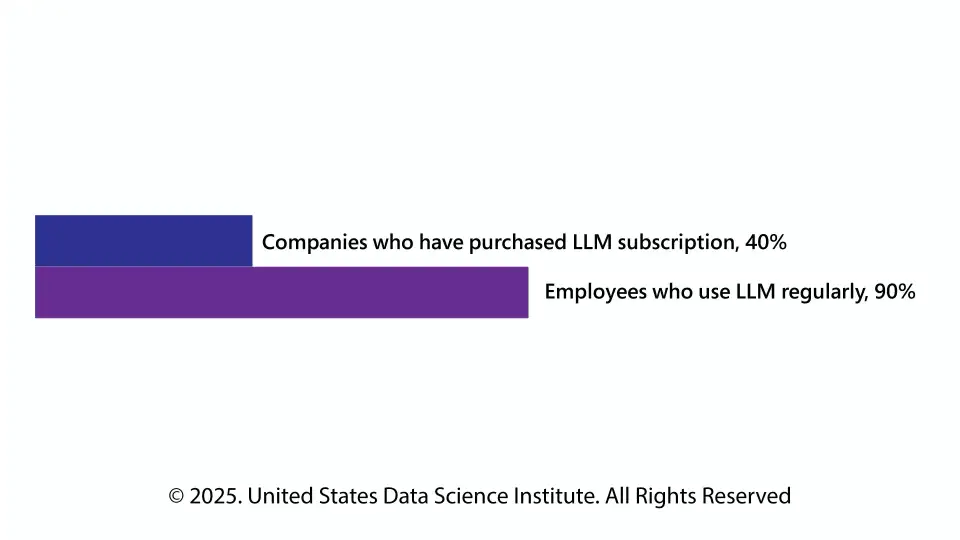
Therefore, we can say that LLM is not an optional part of any business workflow. Already, 90% of employees are leveraging LLMs regularly to take help in completing their tasks.
Top 5 Docker Containers for Large-Model Development (2026)
The following are 5 powerful, commonly used Docker containers that help take the LLM development, fine-tuning, and deployment burden off your hands.
1.NVIDIA NIM (multi-LLM Docker container)
What it is
NVIDIA NIM is an all-in-one container that does the loading, optimizing, and serving of various types of LLMs automatically. It auto-detects appropriate model formats, picks the correct backend (vLLM, TensorRT-LLM, or SGLang), and initiates inference servers with minimum user intervention.
Pros:
Cons:
Use case:
Good for teams that want to be able to quickly deploy different models without having to spend a significant amount of manual tuning — especially if you’re working with potentially several model architectures or quantization formats.
2. Hugging Face Transformers Accelerate Container
A container that packages the well-known Hugging Face Transformers library (for loading, tokenization, inference, fine‑tuning) together with Accelerate, a simple library that scales model training/inference across GPUs and machines.
Pros:
Cons:
Use Case:
Perfect for researchers or developers to experiment, adjust, or prototype various language models — like downloading a model from the hub and building your own transformer‑based chatbot.
3. NVIDIA CUDA and cuDNN Base Image
Base image maintained by NVIDIA that bundles the CUDA toolkit and cuDNN library for GPU‑accelerated machine learning frameworks.
Pros:
Cons:
Use Case:
Ideal when you want a clean, GPU-enabled base for your own deep‑learning container — such as training or fine-tuning large models or mixing multiple sources of custom CUDA code within the same service.
PyTorch Official Image (GPU‑enabled)
A Docker image encapsulating the PyTorch deep learning framework, pre‑installed and configured to utilize GPUs with CUDA and other required libraries.
Pros:
Cons:
Use Case:
Ideal when you need to train or fine‑tune models with minimal overhead — for example, when experimenting with new LLM architectures, fine‑tuning an existing model, or developing custom variants.
5. Jupyter‑Based Machine Learning Container
A Docker image consisting of Jupyter (or JupyterLab) as a development interface, together with all the required ML frameworks and GPU support. A large number of developers build from a CUDA/PyTorch base and add Jupyter with libraries, such as Transformers, Accelerate, etc.
Pros:
Cons:
Use Case:
Great for experimenting, prototyping, data science work — e.g., testing how a model will behave from prompts to dataset outputs, debugging fine‑tuning pipelines.
Wrapping Up
The majority of today’s language model development work has shifted from monolithic systems to Docker containers. Whether you are organizing a large language model, trying out new ML frameworks, or simply fine-tuning with PyTorch inside a well-established Machine Learning container, your setup determines your speed and success. So, choose the right Docker for your LLM development wisely, and transform your innovation free of any constraints.
This website uses cookies to enhance website functionalities and improve your online experience. By clicking Accept or continue browsing this website, you agree to our use of cookies as outlined in our privacy policy.