
The requirement for real-time analytics continues to grow as organizations look to real-time access to business data. One of the most important elements of this ecosystem is the Power BI Gateway which securely connects on-premises data sources to the Microsoft PowerBI Service for data refresh and for continuous reporting without having to expose on-premises systems.
The BI market keeps expanding, particularly the tools like Power BI Gateway that are becoming increasingly important. The global Business Intelligence (BI) software market is gaining momentum by significantly growing from the current USD 54.0 billion in 2026 to almost USD 90.38 billion by 2030, according to Precedence Research.
But various companies keep their critical business information on their own databases, enterprise resource planning (ERP) systems and enterprise applications. When local data must be accessed securely for cloud-based reporting tools, this poses a problem. To solve this problem, Power BI Gateway creates a secure connection between on-premises environments and the Power BI cloud service.
Understanding how this connection works is important for establishing reliable, secure and efficient reporting environments.
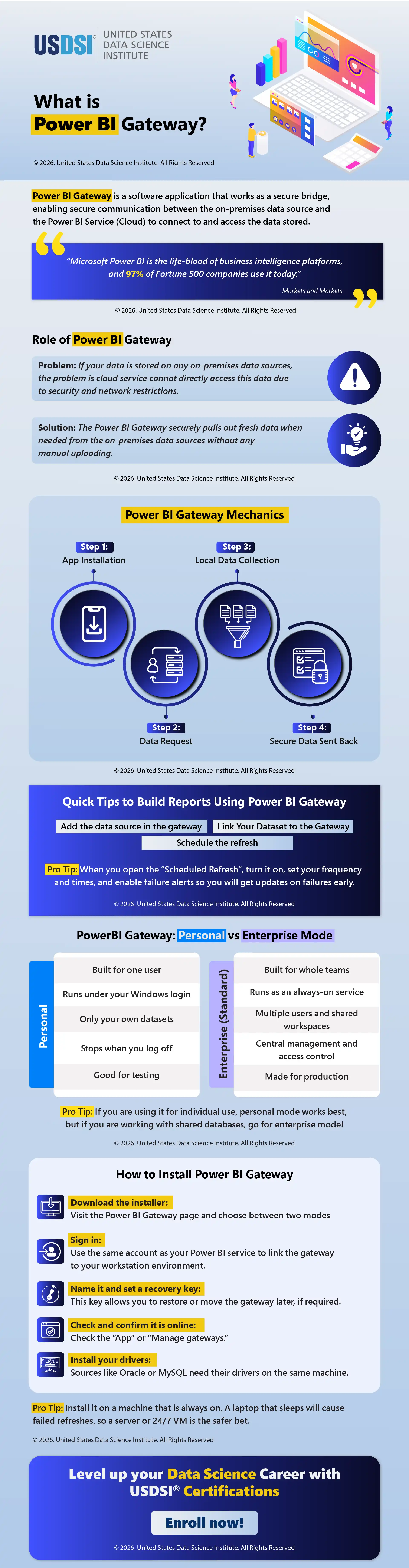
This infographic looks at what Power BI Gateway is, how it works, tips for designing reports, the difference between Power BI Gateway personal and enterprise modes and the steps to take for a successful installation and deployment.
This website uses cookies to enhance website functionalities and improve your online experience. By clicking Accept or continue browsing this website, you agree to our use of cookies as outlined in our privacy policy.